
34 years go, in the little country of Denmark, a software package called Navigator was born. Multiple decades later, we now have Microsoft Dynamics 365 Business Central. In this video, I go back to 1987 and do a deep dive into the first version, called Navigator, version 1.1a. Come watch a piece of software that very, very few people in the industry has ever seen:

I have Navigator installed on a time appropriate machine and everything works:


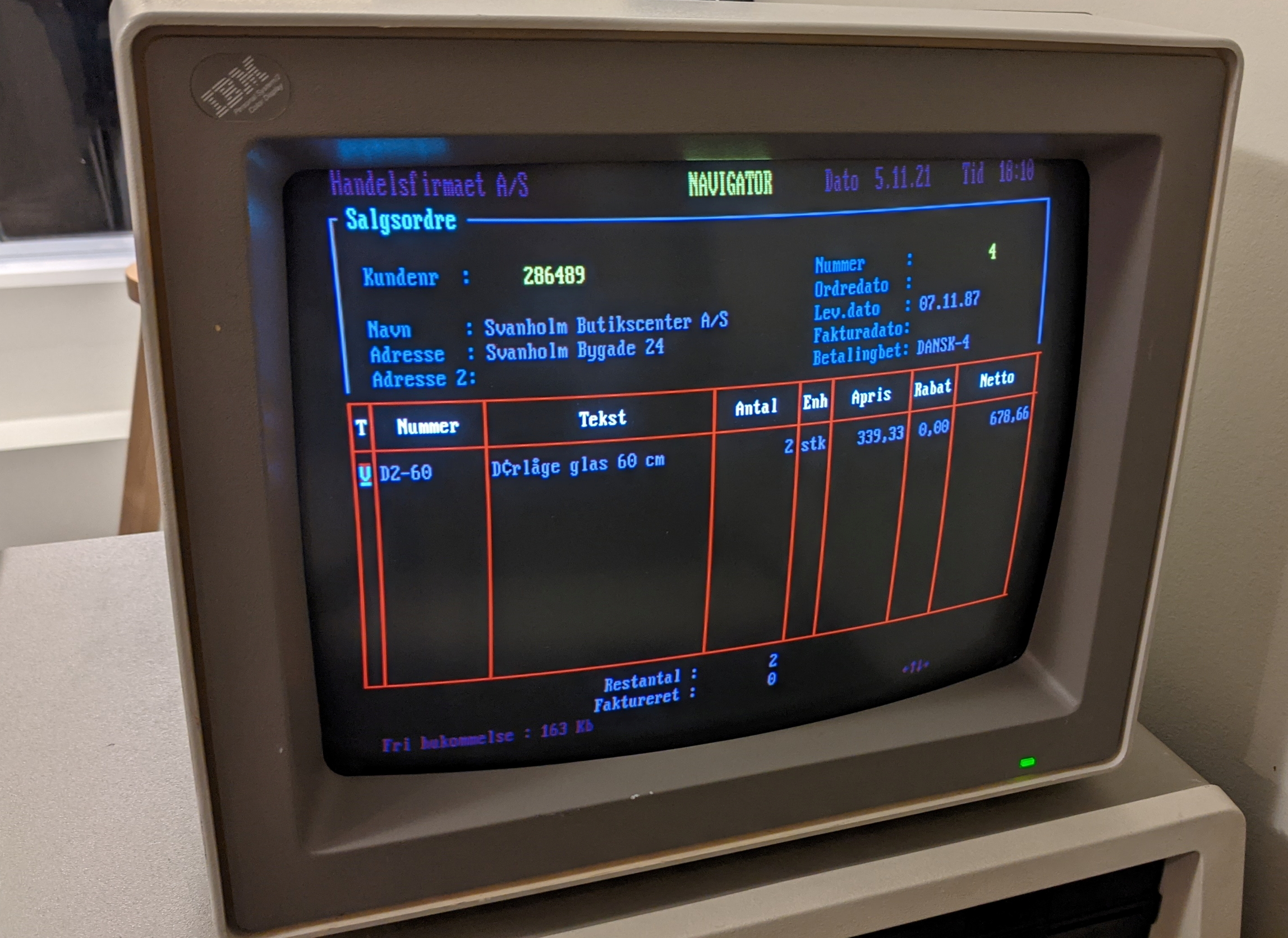
In this video, Erik takes us on a fascinating journey back to 1987 to explore Navigator 1.1 — the software that would eventually evolve into what we know today as Microsoft Dynamics 365 Business Central. Running on original IBM PS/2 hardware, Erik demonstrates the actual software from original floppy disks that still work after 34 years, revealing just how many features and design patterns from this early DOS application survive in today’s modern cloud ERP system.
The Origin Story: IBM Meets Danish Innovation
In 1987, IBM had just introduced the PS/2 computers and the Token Ring network. To promote network-connected PCs and drive sales, IBM wanted a multi-user accounting system available in multiple markets, including Denmark. However, what IBM had on the shelves couldn’t work in Denmark — the currency requirements, multiple currencies, Danish VAT, and other local needs made their existing software unsuitable.
IBM looked at the Danish software market and noticed a popular single-user program called PC Plus, created by three developers: Jesper, Torben, and Peter. IBM approached them and asked if they could create a multi-user version for the IBM PS/2 and its network. Rather than converting PC Plus, they created an entirely brand-new application called Navigator.
In many markets, it was promoted and marketed as IBM Navigator because it was exclusively sold through IBM partners. You had to become an IBM Business Partner to be allowed to sell it. Erik himself went through a seven-week training program at IBM in 1990 (on version 3), straight out of high school — but the version shown in this video is the very first release: version 1.1 from 1987.
The Unicorn Software
Erik describes Navigator 1.1 as a “unicorn piece of software” — if you ask around in the community, virtually nobody has ever seen it. The copy Erik demonstrates came from his father’s workplace, which purchased Navigator in late 1988. His father never threw it out, and remarkably, the 34-year-old floppy disks could still be read.
The software came in a leather-bound red binder with gold lettering that read “Navigator,” complete with gold trim inside the binder. The disks came in a sealed ziploc bag as an authorized copy, available in either 3.5-inch or 5.25-inch floppy format.
The Mission Statement
On the very first page of the manual, there’s something resembling a mission statement, and Erik finds it remarkable how well it still matches Business Central’s philosophy today. It describes how existing software at the time forced people to change their habits and ways of working. Navigator’s approach was different: work with people the way they already work, and simply make it better by adding computer automation. It also stated that the user interface should match how manual procedures look, and that UI patterns should be replicated throughout the system so users don’t have to learn many different things — which is exactly the concept we know today where all the UI follows consistent patterns.
Technical Architecture
Navigator 1.1 was a pure DOS program. Later versions (version 3 and beyond) added Unix and other platforms, but this version ran exclusively on DOS. The entire application was programmed in Turbo Pascal 3.0.
Looking at the file sizes reveals an impressive feat of engineering:
INST.COM(installer) — barely 2 KBNAVIS.COM(standalone version) — 2.5 KBNAVIW.COM(workstation/client) — 2.5 KBNAVIL.COM(server) — 2 KB
These were all .COM executables, which in DOS meant they could only use 64 kilobytes of memory. In theory, you shouldn’t be able to create programs exceeding 64 KB as .COM files — but the developers were creative. The actual program modules were stored as separate .MOD and .PRD files. Using DOS’s ability to install programs as memory-resident (TSR) applications, multiple modules could be loaded into memory simultaneously and interact with each other.
Client-Server Before Anyone Called It That
The installation program offered several options: install the program, create a new database, create batch files for single-user mode, create a workstation batch file, or create a server batch file. This was essentially a client-server architecture before the term “client-server” was widely used. The workstation concept allowed multiple users to connect to a shared server — exactly what IBM wanted for their Token Ring networks.
The Database
The database that shipped on the floppy disks was only 352 kilobytes. Erik discovered the hard way that this wasn’t very much — the program would crash with errors when it ran out of database space, requiring manual expansion through the installation utility. For context, the biggest partition you could create in DOS 3.3 was 32 megabytes, so storage constraints were a real limitation of the era.
The command-line parameter style for specifying database path, cache size (20 KB), keyboard type, and monitor type (EGA) was remarkably similar to how parameters were passed to Business Central’s executables all the way up through version 14:
DATABASE=DATABASE CASH=20 KEYBOARD=80 MONITOR=EGAThe User Interface Tour
Erik runs the demo on an 8 MHz IBM PC, so everything shown is at the actual speed a user would have experienced in 1988. Despite the hardware constraints, the software feels snappy and responsive.
Main Menu
The main menu features impressive ASCII art with the Navigator logo. The version shown is copyright 1987, version 1.18, licensed for one user (N1). The menu is organized into columns that you navigate with the cursor keys:
- Master Data — Chart of Accounts, Customers, Vendors, Items, Company Information
- Posting — General Journal, Item Journal, Inventory Adjustment
- Sales — Quotes, Sales Orders, Invoices, Credit Memos
- Purchase — Similar structure to Sales
- Printing — Extensive report library
- Information — Groups, VAT, Currencies, Payment Terms, and more
Company management was available from the top level: open a company, create a company, delete a company, create/restore backups, and manage passwords. The security model was simple — users with a password, and a flag for whether they were a “super” user or not.
Chart of Accounts
Opening the chart of accounts immediately reveals familiar concepts: Begin-Sum, End-Sum, and regular Account types. Pressing F6 shows whether an account is an Income Statement or Balance Sheet account. VAT settings are directly on the account — there’s no separate card behind the list.
One notable difference from later versions: there’s no visible menu on the screen. All functions are accessed through F-keys. Pressing F1 reveals a function key overview showing available functions for normal keys, Ctrl combinations, and Alt combinations.
The Designer — Born in 1987
Perhaps the most remarkable feature: pressing Ctrl+F2 opens the designer for the current page — exactly like the Classic Client would do decades later. In the chart of accounts list, the designer shows all available fields and lets you add custom fields to the screen by assigning them a column number:
Erik demonstrates adding a custom field called “Erik’s field” by giving it column number 6, exiting the designer, and seeing the screen reload with the new field displayed. This design-mode capability would remain a hallmark of the platform for its entire history.
Statistics and Matrix Views
The system includes statistics pages (similar to what we know today) and a matrix-style movement page where you can scroll through different time periods: year, quarter, 12-month, 49-week (because “Danes love week numbers”), and all the way down to individual dates. Erik notes that these matrix views were “kind of lost on the way” in later versions, which he finds unfortunate.
Budgets with Dimensions
The budget feature already supports dimensions (departments). You could enter a budget amount of 600, then use a “distribute budget” function (F9) to automatically spread it across dimensions based on distribution keys — for example, 2 parts for one department and 3 parts for another, out of a 5-part total. The system supported up to 5 budget buckets, though they were fixed rather than user-definable.
Customers, Vendors, and Items
Customer and vendor cards look remarkably similar to their modern equivalents, with most fields still recognizable today. The search function (F7) lets you type a search term on any field to find matching records — “pretty cool and pretty fast.”
A fun UI detail: when the developers ran out of F-keys for the statistics views, they added a small pop-up sub-menu in the middle of the screen to let you choose between different views (e.g., amounts vs. due amounts, individual customer vs. all customers).
Items have an interesting twist: when creating a new item, the system asks what kind it is — an Item, a Service, or a BOM (Bill of Materials). Erik notes the irony: “Interesting that we had service items 34 years ago, then we lost them along the way and only recently gained them back.”
There’s also an ever-present calculator accessible from anywhere in the system, with the on-screen key layout matching the physical layout of the IBM Model F keyboard’s numeric keypad.
Company Information and Number Series
Company information contains most of the same data we’d expect today, with one key difference: there were no number series. Instead, the company card simply stored “Last Quote Number,” “Last Sales Order Number,” “Last Invoice Number,” and so on, with the numbers managed directly on this single screen.
Accounting periods are also managed here, with a charming ASCII art display of the calendar year. The system supports the concept of deleting (compressing) data from closed periods — an early precursor to date compression, born of necessity since the biggest DOS partition was only 32 megabytes.
Posting and Journals
The general journal looks just like what Business Central users know today. The item journal supports multiple transaction types: Purchase, Sales, Positive Adjustment, Negative Adjustment, Production, and Usage.
An interesting feature is journal numbering: you could maintain sequential journal numbers (e.g., one per month for month-end processing), switching between them as needed. Separate journal sequences existed for GL/Customer/Vendor and for Inventory.
Sales and Purchase Documents
Sales documents include Quotes, Sales Orders, Invoices, and Credit Memos. The sales order looks much like a modern one: customer selection, delivery address, and line items that scroll into view as you move the cursor down.
And here’s a wonderful coincidence (or is it?): the key to post a document is F9 — the same key used in Business Central’s classic client. Erik jokes: “I’m pretty sure that nobody at Microsoft, when they reassigned F-keys for Business Central and decided to go with posting on F9, knew this. But anyway, prove me wrong.”
One notable difference from modern Business Central: there is no separate “Posted Sales Invoice” table. The invoice simply gets marked as “finished” in the same table. And you cannot delete an invoice until it has been printed — enforcing a paper trail. On the purchase side, there’s a quirk: you can’t even see whether an invoice is finished without opening the individual record.
Reports and the Report Designer
Reports were critically important in this era — everything was still paper-based. Navigator shipped with an extensive library of reports. Even more impressive, it included a full-fledged report designer.
The designer shows report sections: Top, Sales Header, Transport (carry-forward), Sales Lines (with conditions), Transport total, Total, Filler, and Bottom. You could insert lines (F3), add fields (F7), set up conditions, and configure layout — all within the constraints of matrix (dot-matrix) printers with a page height of 51 lines and page width of 76 characters.
Printer setup included escape code definitions for formatting: bold, double-width, underlined, compressed, and more. The system supported printer selection tables — a feature that still exists in Business Central today.
Data Import and Export
The system included a data import/export module with a generic importer where you could map fields from external files, specify date formats, and import data — a capability Erik notes “we don’t really have anymore” in the same generic form.
The Table Numbers That Prove the Lineage
Perhaps the most compelling proof of Business Central’s direct lineage comes from the table export function. When Erik opens the table list, the table numbers tell the whole story:
- Table 15 — G/L Account (Chart of Accounts)
- Table 17 — G/L Entry
- Table 18 — Customer
- Table 21 — Customer Ledger Entry
- Table 23 — Vendor
- Table 25 — Vendor Ledger Entry
- Table 27 — Item
“You’re looking at Business Central,” Erik declares. These are the exact same table numbers used in Business Central today, 34+ years later.
Groups, VAT, and Configuration
The Universal Group Concept
Instead of the separate posting groups we know today (Customer Posting Groups, Vendor Posting Groups, Inventory Posting Groups, etc.), Navigator 1.1 had a single unified “Groups” concept. The same group definition served for customers, vendors, and items — because there simply weren’t enough fields to warrant separate group types yet.
VAT
The Danish VAT rate at the time was 22%, and Erik notes with amusement that the VAT codes from this original version “lived on for so long in the Danish setups.”
Payment Terms and Date Calculations
Date calculation formulas were already fully formed in 1987, using essentially the same syntax that Business Central uses today:
8D— 8 days2U— 2 weeksLM— current monthLM+10— current month plus 10 daysLU+1U— this week plus next weekU15— fixed on the 15th of the monthLM+1D-UD4— the last Thursday of the current month
Other Configuration
The Information column also housed currencies (German Mark, French Franc, Italian Lira), financial interest/reminder settings, price groups (with VAT inclusion and discount flags), and a “miscellaneous” catch-all menu that appeared as a pop-up when they ran out of screen space. This miscellaneous menu contained: Text, Languages, Countries, Delivery Methods, Departments, Projects, Salespersons, and Locations.
The Database Check Utility
The version also shipped with a database utility called DBCHECK. Since this was the first incarnation of the native database that would later become famous (and later infamous) as the C/SIDE database, having a database verification tool was essential. Erik draws a parallel to the later CDOT database administrator recovery tool that Microsoft maintained.
Running the utility on the demo database showed it had grown to 1.6 megabytes, with details like 16 customers taking 734 bytes per record (11.7 KB total for the customer table). The tool verified database integrity and reported space usage — 68% used in this case.
Source Code: A Glimpse at the Programming Model
While the video focuses on Navigator 1.1, the source code provided offers a look at how the programming model evolved in later versions. This code shows a “Post-proc.code” (post-processing code) from 1993 (version 3.x era, marketed as “Navision”), demonstrating the trigger-based programming approach that would become C/AL and eventually AL:
// DELETE trigger for Prod.Gr (Product Group) table
dbLOCKFILE(ProdGrEntry);

dbCALCFIELDS("Stock(CPrice)");
dbTESTFIELD("Stock(CPrice)",0);

dbSELECTKEY(ProdGrEntry."Prod.Gr No.");
dbSETRANGE(ProdGrEntry."Prod.Gr No.","No.");
dbMODIFYALL(ProdGrEntry."Prod.Gr No.",'');

dbSETRANGE(CommLine.File,6);
dbSETRANGE(CommLine."No.","No.");
dbDELALL(CommLine);

dbSELECTKEY(PurchaseLine."Voucher Type",PurchaseLine.Type,
  PurchaseLine."No.",PurchaseLine."Deliv.Date");
dbSETRANGE(PurchaseLine."Voucher Type",1);
dbSETRANGE(PurchaseLine.Type,4);
dbSETRANGE(PurchaseLine."No.","No.");
IF dbFINDREC(PurchaseLine,'-') THEN
  ERROR('There are purchase orders for product group %1',"No.");
Even in this early code, the patterns are immediately recognizable to anyone who has written AL code for Business Central. The dbSETRANGE calls correspond to today’s SetRange, dbFINDREC to FindSet/FindFirst, dbMODIFYALL to ModifyAll, dbDELALL to DeleteAll, and dbTESTFIELD to TestField. The ERROR function with %1 substitution tokens is identical to today’s syntax.
// SAVE trigger - automatically sets edit date
"Edited on" := TODAY;

// Name field trigger - generates Search Name from cursor position
IF (1 < CursorPos) AND (CursorPos < MAXSTRLEN("Search Name")) THEN BEGIN
  "Search Name" := DELCHR(COPYSTR(Name,CursorPos),'<>');
  "Search Name" := SETSTRLEN("Search Name" + ' ' +
    DELCHR(COPYSTR(Name,1,CursorPos-1),'<>'),MAXSTRLEN("Search Name"));
END ELSE
  "Search Name" := Name;
The variable declarations section also shows how the programming model was structured — with External and Internal variables, Record types linked to specific files (tables), and familiar data types like Integer and Record. The concept of having triggers on specific fields (like “Name” and “Superior Prod. Gr”) that fire when the field value changes is the same OnValidate trigger pattern used in AL today.
Summary
Navigator 1.1 from 1987 is arguably the oldest piece of software directly related to Microsoft Dynamics 365 Business Central that can still be found. The demonstration reveals a remarkable number of features and design patterns that have survived 34+ years of evolution:
- Table numbers (15, 17, 18, 21, 23, 25, 27) are identical to Business Central today
- F9 to post documents
- Ctrl+F2 for the designer
- Date calculation formulas using the same syntax
- The general journal, sales/purchase documents, and ledger entries
- Printer selection tables and report design
- The mission statement about adapting to how users work rather than forcing new habits
- Consistent UI patterns throughout the application
- The programming model with triggers, record types, and data manipulation functions
As Erik eloquently puts it: “I think it’s important for at least the people at Microsoft to understand the giants they stand upon, and the tremendous work that happened, and the value of what was made, and how right they got it back in the stone age.” What Jesper, Torben, and Peter created in 1987 laid the foundation for an ERP platform that now serves hundreds of thousands of businesses worldwide — and its DNA is still clearly visible in every Business Central installation running today.
