
Copy. Paste. Done.

Magic Paste
Paste data into Business Central, just like magic!
Copy rows anywhere. Paste them into Business Central.
Excel, Google Sheets, a CSV, a web page, an email. Copy the rows, click the Magic Paste box, press Ctrl+V. The rows become journal lines, document lines or master data on the page you already have open.

The problem it fixes
Everyone has data sitting in a spreadsheet that needs to end up in Business Central. A bank statement someone cleaned up. Fifty new items from a supplier price list. A month of expense lines. Twenty order lines a customer sent as a table in an email.
Today that means a configuration package, an Edit in Excel round trip, or typing it in line by line. All of them are slower than the job deserves.
Magic Paste does what you expected Ctrl+V to do in the first place.
How it works
1. Copy
Select the rows in whatever you have them in. Magic Paste detects tab, comma, semicolon and pipe separated text, and handles quoted cells with line breaks.
2. Paste
Click the Magic Paste box in the FactBox pane and press Ctrl+V. Or drag text or a file onto it.
3. Map
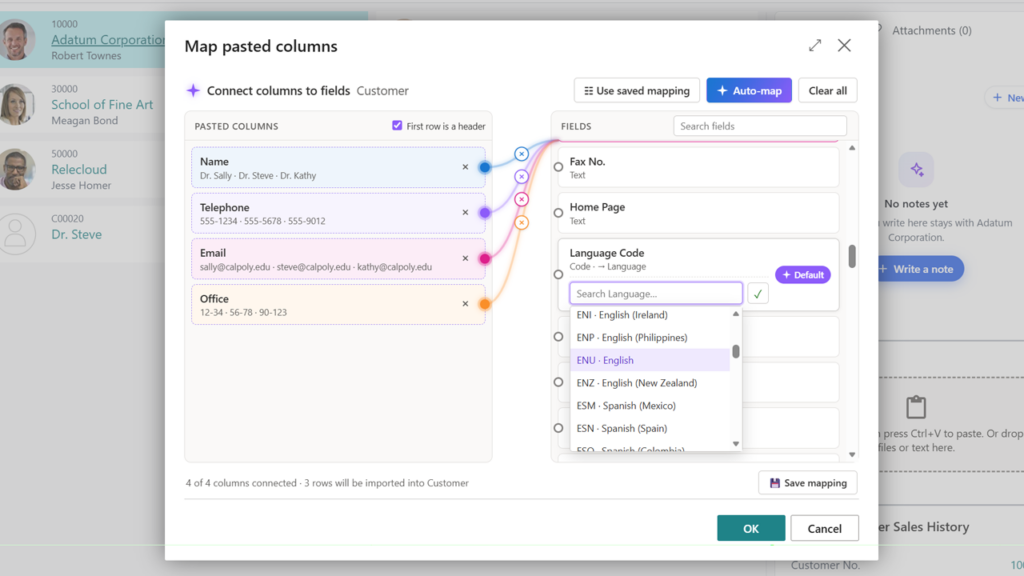
Columns are matched to fields automatically by caption or field name. Change any match, ignore columns you do not need, and give unmapped fields a default value. Defaults have lookups, so picking an account or a location works the way it does everywhere else in Business Central. If your first row is data instead of headers, Magic Paste notices, and you can override it.
4. Done
Click OK. Every row goes through standard validation, exactly as if you had typed it. The whole paste is one transaction: if row 37 has a bad account number, nothing is inserted and the message tells you the row, the column and the value.
Save the mapping
Paste the same layout every month? Name the mapping once and pick it from a list next time.
Ready to try it?
Magic Paste is free to use in cloud sandboxes.
Try how easy it is to paste your data.
Install from AppSource, open a journal, copy some rows, press Ctrl+V.
Done testing?
When you are sure the Magic Paste is the right choice for your business, you can buy a yearly license and use it in your production environment.
Magic Paste
The license covers both production and sandbox environment(s) for one tenant.
USD 199/year
Where it works
Magic Paste ships on more than 80 pages. No setup, no per-page configuration.
Journals
General, Payment, Cash Receipt, Sales, Purchase, Item, Item Reclassification, Physical Inventory, Revaluation, Resource, Job, Job G/L, Fixed Asset, FA G/L, FA Reclassification, Insurance, Cost, Consumption, Output, Capacity, Intercompany, Warehouse Item, Warehouse Physical Inventory, Warehouse Reclassification, and the recurring versions.
Documents
Sales and purchase quotes, orders, invoices, credit memos, return orders and blanket orders. Service quotes, orders, invoices and credit memos. Transfer orders, assembly orders, reminders and finance charge memos. Pasted rows become lines on the document you have open.
Master data and setup
Customers, Vendors, Items, Item Variants, Item Categories, Contacts, Resources, Employees, Fixed Assets, Jobs, Chart of Accounts, Bank Accounts, Customer and Vendor Bank Accounts, Ship-to Addresses, Locations, Dimension Values, Currencies, Countries/Regions, Post Codes, Payment Terms, Units of Measure, Salespeople/Purchasers.
Worksheets
Requisition, Planning, Subcontracting, Job Planning Lines and Service Lines.
It behaves like Business Central, because it is Business Central
Magic Paste does not write to tables behind the back of the application.
Page defaults apply
New journal lines get the posting date, document number and balancing account the journal would have given them. New sales and purchase lines get the line type and the header’s defaults.
Validation applies
Every value is validated through the table’s own code. Your posting groups, dimensions, blocked records and number formats are enforced. Extensions that hook into those fields keep working.
Filters apply
You paste into the batch, document or list you are looking at. Lines land in the right template and batch, and line numbers are assigned automatically.
All or nothing
A paste is a single transaction. One error rolls back the entire batch.
Your questions answered
FAQ
For developers
Magic Paste is built to be extended.
Does it work in the browser and in the Windows app?
Yes. Magic Paste runs in the Business Central web client, which is also what the desktop app uses. Paste and drag-and-drop both work.
Does it need Excel or an add-in?
No. Anything that can put delimited text on the clipboard works: Excel, Google Sheets, Numbers, a text editor, a web page, an email.
What about dates and decimals?
Values are interpreted using the Business Central user’s region settings, the same way typed input is. If a value cannot be converted, the paste stops and the message names the row and column.
Can I paste into a page you have not covered?
Partners can add the FactBox to any page with a small page extension. If you think a standard page is missing, tell us.
Does it post anything?
No. Magic Paste inserts lines. You review and post as you always do.
Which versions of Business Central does the app work in?
Business Central in the cloud, version 28 and later.
Add it to your own pages.
Drop the Magic Paste FactBox into a page extension and hand it a RecordRef. That is the whole integration.
Take over the paste.
Subscribe to the content event and handle it yourself. The FactBox accepts files too, so a dropped PDF or image reaches your code as a blob, ready for your own import or AI pipeline.
Steer the mapping.
Override how a column header resolves to a field, apply your own defaults to new records, or react after the import finishes.