
In this video, I take a look at the confusing labelling of functions to get data in and out of complex data type in Dynamics 365 Business Central.
Get the image here:
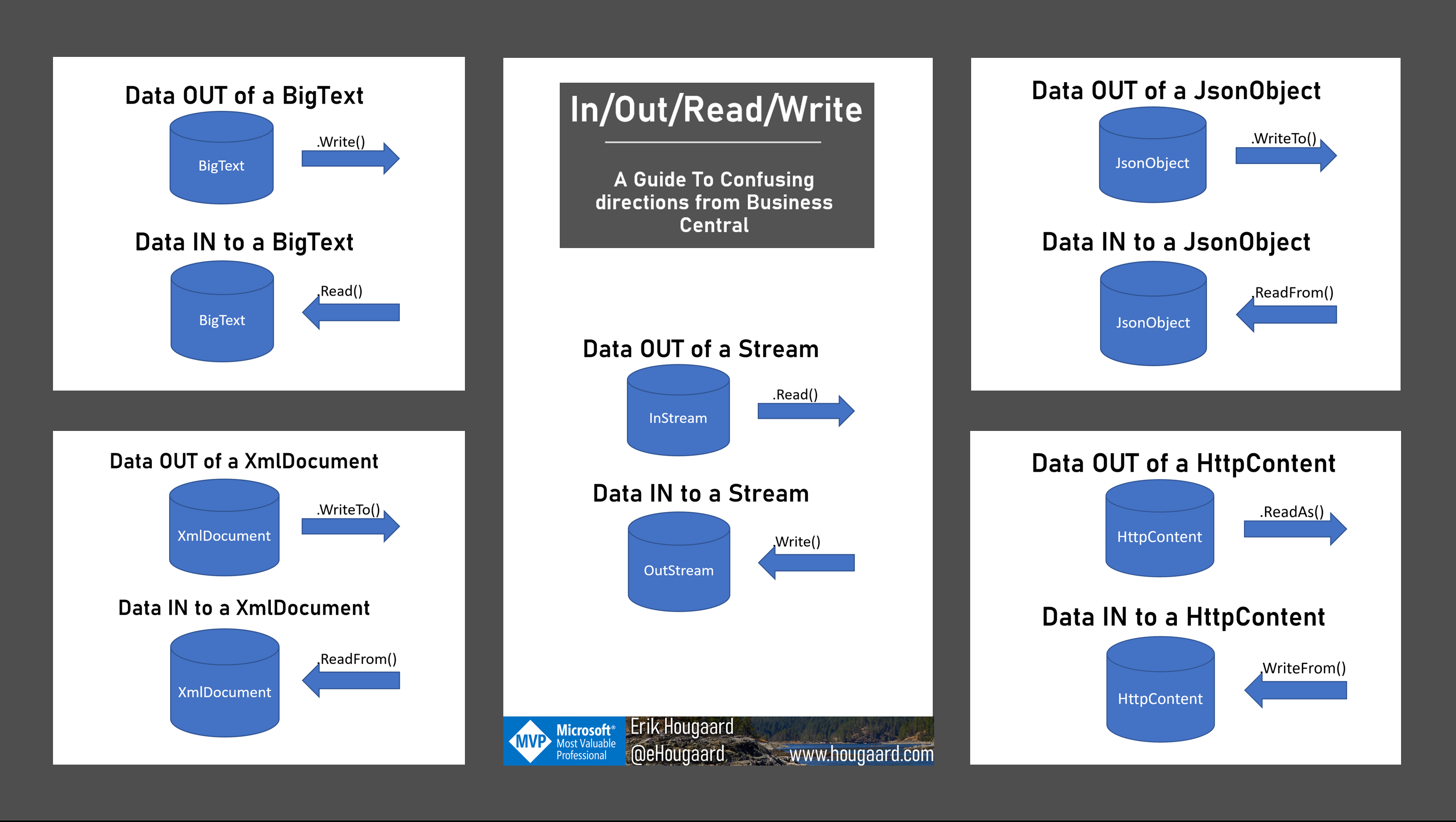
In this video, Erik tackles one of the most common sources of confusion for Business Central developers: the inconsistent naming conventions for reading and writing data across different data types. If you’ve ever found yourself guessing whether to use ReadFrom, WriteTo, ReadAs, or WriteFrom, you’re not alone — and this quick reference guide will save you a lot of trial and error.
The Problem: Inconsistent Directions
Business Central has a wide variety of data types, and many of them require you to put data in or take data out. The frustrating part? The method names for doing so are wildly inconsistent across different types. The terms “read,” “write,” “in,” “out,” “from,” and “to” are combined in different ways depending on which data type you’re working with.
As Erik puts it: “I get this wrong all the time — and I’ve been using some of these for years.”
Data Type by Data Type Breakdown
Streams (InStream / OutStream)
Streams are one of the oldest constructs in Business Central for moving data around:
- Get data out:
Readfrom anInStream - Put data in:
Writeto anOutStream
So to get data out of something (like a BLOB), you read from the InStream. To put data in, you write to the OutStream. Already we see the naming feels a bit backwards — “In” and “Out” refer to the direction relative to the source, not the variable you’re working with.
JSON Objects
- Get data out:
WriteTo— writes the JSON object’s content out to a string or stream - Put data in:
ReadFrom— reads from a JSON string and populates the JSON object
So if you have a JSON string and you want to parse it into a JsonObject variable, you use ReadFrom. If you want to serialize the object back out, you use WriteTo.
XML Documents
- Get data out:
WriteTo— serializes the XML document out to a string or stream - Put data in:
ReadFrom— parses XML content into the document variable
XML Documents follow the same pattern as JSON objects, which is at least a small mercy.
HTTP Content
- Put data in:
WriteFrom— writes data from a source into the HTTP content - Get data out:
ReadAs— reads the content out as a string or stream
Here the naming takes yet another turn. Now we have WriteFrom for getting data into the content and ReadAs for getting data out. This is a completely different combination from the JSON and XML patterns.
BigText
- Get data out:
Write— writes the BigText content out to a stream - Put data in:
Read— reads data from a stream into the BigText
BigText keeps it simple with just Read and Write, but without the directional suffixes, you still need to remember which direction they go.
The Complete Quick Reference
Here’s a summary table of all five data types and their corresponding methods:
| Data Type | Get Data IN | Get Data OUT |
|---|---|---|
| InStream / OutStream | Write (to OutStream) | Read (from InStream) |
| JsonObject | ReadFrom | WriteTo |
| XmlDocument | ReadFrom | WriteTo |
| HttpContent | WriteFrom | ReadAs |
| BigText | Read | Write |
Conclusion
The inconsistency in method naming across Business Central’s data types is a genuine stumbling block, even for experienced developers. There’s no underlying logic that unifies all of these — you simply have to memorize them or keep a reference handy. Erik has made a printable version of this reference available on his homepage at hoecker.com, which you can download, print, and pin next to your monitor. Sometimes the best developer tool is a good cheat sheet.
