Simple Object Designer +Reports
The Report Designer Business Central Always Deserved
Design beautiful, print-perfect report layouts directly inside Business Central. No RDLC. No Word documents. No external tools. Just point, click, and print.
For twenty years, changing a report layout in Business Central has meant exporting files, wrestling with Word merge fields or RDLC expressions, and praying the result lines up on paper. Those days are over.
+Reports puts a full visual report designer right inside Business Central — with a built-in AI assistant that can design entire layouts for you.
See What You Print. Print What You See.
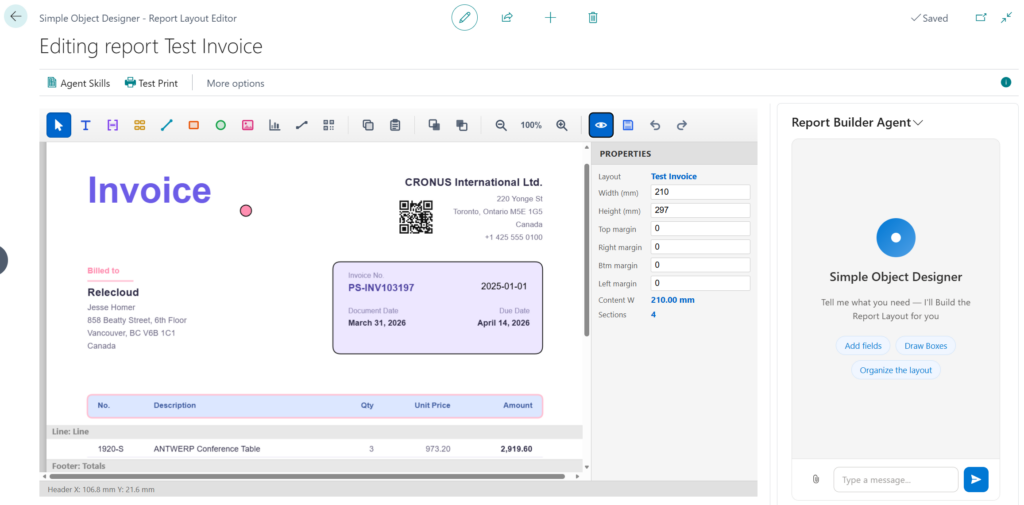
Open any report and design its layout on a live canvas. Drag, drop, nudge, and align every element at exact millimeter precision — what you see in the editor is what comes out of the printer.
- True WYSIWYG preview — flip a switch and see your layout filled with real example data from your own system
- Test Print anytime — one click runs the actual report with live data and hands you the finished PDF
- Everything you’d expect from a modern editor — copy/paste, undo/redo, multi-select, zoom, keyboard shortcuts, layering
Every Element Your Documents Need
Build with a complete toolbox of professional layout elements:
- Text and data fields bound directly to the report’s dataset — no expressions, no code
- Lines, boxes, and circles with fills, rounded corners, colors, and opacity
- Your logo and images (JPEG/PNG) plus crisp, scalable SVG graphics
- Charts — column, bar, line, area, pie, and donut — rendered straight from your report data
- QR codes, static or data-driven, for payment links, document lookups, and more
- Hyperlinks that make your PDFs interactive
- Built-in barcode and banking fonts — Code 39, EAN-13, Code 128, and MICR for printing bank checks, included out of the box
Your AI Report Designer, Built In
Meet the Report Builder Agent — an AI assistant that lives right inside the layout editor.
Tell it what you want. Watch it build.
- “Create a clean, modern invoice layout with our logo top right.”
- “Recreate the attached document as closely as possible.” — yes, you can attach a PDF or photo of an existing form and the agent rebuilds it
- “Add a group per customer with a subtotal under each group.”
- “Add a ‘DRAFT’ watermark diagonally across every page.”
The agent doesn’t just guess — it test prints its own work, looks at the resulting PDF, and fixes what it sees, iterating until the layout is right. You watch it happen live on the canvas, and you can interrupt and redirect it at any time.
Teach it your standards once with the skill library (“all amounts right-aligned, two decimals, always use our brand font”) and it applies them in every session.
Bring your own AI — works with Azure OpenAI, OpenAI, Anthropic (Claude), or even a fully local model via LM Studio. Your data, your provider, your agreement.
One Brand. Every Document. Automatically.
Your quotes, order confirmations, invoices, credit memos, reminders, and statements should all look like they came from the same company. With Report Sets, they finally do.
- Populate a set with all your customer-facing documents in one click
- Design one document until it’s perfect
- Run Learn Skill from Layout — the AI captures your visual style as a reusable description
- Run Apply Skill to All Reports — and watch your entire document suite restyle itself to match
Shared fonts and logos live on the set and sync to every report automatically. Rebranding your company? That’s now an afternoon, not a project.
Real Report Logic, Zero Code
This isn’t a label designer — it’s a full document engine:
- Headers, footers, and repeating line sections for real business documents
- Grouping with group headers and footers, group break fields, and per-group subtotals
- Sorting on any columns, with proper text, number, date, and time ordering
- Running totals and “carried forward / to be continued” transport sections across page breaks
- Conditional printing — show or hide any section based on your data
- Page breaks, print-on-first/last-page control, and page footers
- Full-page backgrounds for watermarks, page borders, and pre-printed stationery reproductions
And for the power users: every section is stored as readable layout code you can edit directly, with per-element trigger logic when you need it. Most layouts never will.
Professional PDF Output — 100% Inside Business Central
Every layout renders through our own PDF engine, built natively in AL. No external services. No add-ins. No server components. Your data never leaves Business Central (unless you choose to use a cloud AI provider).
- Embedded TrueType/OpenType fonts — your brand typography, pixel-perfect on every device
- PDF encryption and permissions — password-protect documents and control printing, copying, and modification
- Document metadata (author, subject, keywords) baked in
Fits Business Central Like a Glove
Layouts you design are standard Business Central custom report layouts. Users pick them in the normal report layout selection — no retraining, no special run mode. They work with report scheduling, email attachments, and everything else BC does with reports.
- Duplicate layouts to iterate safely
- Export/Import complete layouts — design, settings, fonts, and images — as a single JSON file, and move them between companies and environments
- Include in App — ship your layouts inside your generated Simple Object Designer extension, like a pro
Try It Free
- Sandbox environments — always free for design and testing
- Existing Simple Object Designer customers — enjoy 90 days of free production use, starting the first time you open the feature. Real reports, real data, no extra license needed to get started.
Get started in three steps
- Choose New and pick the report you want a layout for
- Open Edit Report and design on the canvas — or just tell the AI what you want
- Test Print with live data, then start printing in production
+Reports. Point. Click. Print.